One powerful tool in the arsenal of app marketers is the strategic use of in-app events. In this article, we delve deep into the world of in-app events, exploring what they are and how they can be harnessed to drive success.
As your trusted app marketing agency, we’ll explain in greater detail, how they’ll impact ASO, and guide you through the intricacies of configuring in-app events with concrete examples.
What is In-App Events?
In-app events are essentially the actions that users take while interacting with your mobile app. These actions, carefully tracked and monitored by app developers, serve as valuable data points to enhance various aspects of the app’s performance and user engagement.
Think of in-app events as the breadcrumbs left behind by users as they navigate through your app’s landscape. Each event represents a specific interaction or achievement within the app.
Where Are They Shown?
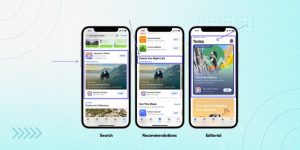
In-app events iOS are prominently showcased across the Apple App Store as event cards, visible on product pages, in search results, and through direct searches. These event cards provide users with quick access to the events associated with your app
.
Moreover, in-app events receive exposure in editorially curated selections and personalized recommendations on the Today, Games, and Apps tabs, enhancing their discoverability and engagement potential.
Configuring In-App Events in App Store Connect
Keep in mind that you can submit up to 10 in-app events in a single submission, but only 5 of them can be published on the App Store at any given time. What’s more, the submissions undergo a speedy 24-hour review process, ensuring swift access for your users.
Begin by logging in to your App Store Connect account. This is your gateway to configuring your in-app events.
When creating your in-app event, pay attention to the following key details:
Reference Name
Assign an internal reference name for organizational purposes within App Store Connect.
Event Information
Fill in comprehensive event details, including metadata. This information provides users with a clear understanding of your event’s purpose and value.
Event Badge
Choose a visually appealing event badge. An enticing badge can make your event more recognizable and enticing to users.
Regional Availability
Specify where your event will be accessible. By tailoring regional availability, you ensure that your event is relevant to specific target audiences.
Take your in-app event setup to the next level by adding these crucial details:
Event Availability
Set the event’s start and end dates. Keep in mind that in-app events can run for up to 31 days and can be promoted up to 14 days before the start date. You also have the option to restrict event availability to specific regions and dates.
Event Deep Link
Provide a seamless user experience with a deep link. This link directs users who tap “Open” on the event card or details page to the event content within your app. It’s highly recommended to use a universal link or custom URL and to avoid URL shorteners.
Event Purpose
Choose the option that aligns with your event’s objectives. Options include suitability for all users, attraction of new users, informing active users, or re-engaging lapsed users.
Event Priority
Events are listed chronologically based on their start dates, with the soonest event displayed first. If desired, you can mark an event as high priority to give it precedence over normal priority events.
Event Cost
Indicate whether participation in the in-app event requires an in-app purchase or subscription.
Maximize User Engagement with In-App Events
Increase your app’s downloads and user base. Click to find out how our agency can supercharge your app’s growth
Capitalizing on them should be part of most ASO strategiessimply because of the following advantages:
1. Enhanced Search Visibility
Boost your app’s discoverability by using keywords on event cards, akin to metadata. When users search for specific events, your event cards appear in results, expanding your reach and attracting potential downloads.
2. Engaging Existing Users
They’re just as important to be a part of user engagement strategies, specifically. Why? Well, users searching for similar events discover your event cards, renewing their interest and encouraging active participation, ultimately retaining their engagement with your app.
3. Editorial Visibility
Help you gain more prominence in editorial collections on the App Store’s Today, Games, and Apps tabs. This premium placement enhances your app’s organic visibility, attracting new users and boosting downloads and interactions.
Some Examples of In-App Events with Their Respective KPIs
These are the practical In-app events examples that prove their value in aiding in App Analytics.
1. Purchase (Revenue):
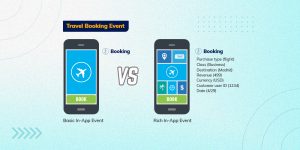
What it does: This event tracks how many purchases are made in your app and the revenue generated from these transactions. To do this, you can create a custom event to monitor when users buy items within your app.
Why it’s valuable: It helps you understand the spending behavior of your users. You can identify patterns among users who make purchases, which can be crucial for app marketers. It also provides insight into whether it’s more profitable to monetize users through ads or in-app purchases (IAP).
KPIs it helps calculate: With this event, you can calculate two essential KPIs. First, the Return on Advertising Spend (ROAS) helps you measure how effective your advertising campaigns are in generating revenue. Second, the payer rate tells you the percentage of users willing to make purchases, aiding in making decisions about acquiring new users.
2. Time Spent on App (Engagement):
What it does: This event tracks the average daily or weekly time users spend within your mobile app. It’s crucial for understanding if users return to your app after initially downloading it.
Why it’s valuable: It helps app publishers gauge user engagement over time. For instance, tracking session time can reveal whether users are having a positive experience with your app.
If you notice a decrease in session times after increasing the frequency of ads, it’s a signal that it might be time to improve the user experience or rethink your ad strategy.
3. App Opens (Returning Customers):
What it does: This event monitors how often users open your app, providing insights into user loyalty.
Why it’s valuable: It’s a useful metric for app marketers aiming to build and measure customer loyalty, which is a facet we’ve highlighted in our Mobile app market research article.
By setting up the app open event, you can track the user retention rate, which compares the total number of app opens to the total number of users acquired in the same cohort.
Conclusion
In the ever-evolving landscape of app marketing, leveraging in-app events is not just a strategy; it’s a necessity. By understanding, configuring, and optimizing these events, you can pave the way for increased success and growth in the competitive world of mobile apps.
There are many app marketing services out there that can’t safely say that they’ve delved into the intricacies of in-app events. We’re confident that you can harness their power with the help of the information we shared here and by having us as your guide.
The Apple A20 Pro chip changes what product teams can reasonably ask an iPhone app to do in real time. Built on a 2-nanometer process, the processor combines a six-core CPU, seven-core GPU, integrated Neural Accelerators, a dual 16-core...
Flutter app development productivity is becoming a strategic priority for businesses that need consistent applications across Android, iOS, web and desktop. While the headline’s 5.5% figure should be viewed as a conservative productivity benchmark rather than a verified Flutter-specific...
Search is moving beyond traditional results pages. Users now ask complete questions through ChatGPT, Perplexity, Gemini, and Google AI Overviews, expecting direct and reliable answers. This shift means brands must optimise content not only for rankings but also for...
Generating traffic is easy; attracting qualified enquiries and sales is harder. Many businesses gain visitors through social media campaigns, but low interest often results in quick exits and few conversions.Reddit offers a more focused opportunity. Users join specialised communities...
App discovery is moving beyond app-store search and paid campaigns. Users increasingly ask ChatGPT, Gemini, Perplexity, and Google’s AI experiences to compare tools, recommend apps, and narrow choices before visiting the App Store or Google Play. This makes AI...
The Google Play App Quality Rules are changing what it takes for an Android app to remain visible, compliant and competitive. According to Appfigures, Google Play's worldwide app inventory declined from approximately 3.4 million apps at the beginning of...
In 2000, a business website was often a digital brochure: a few HTML pages, contact details, and a basic form. Today, software can interpret intent, generate content, call APIs, coordinate tasks, and act with limited human intervention. Technology Evolution...
Generating B2B leads is easy. Generating qualified leads that can become high-value enterprise clients is harder.Enterprise buying journeys often involve multiple stakeholders, approvals, vendor comparisons, and months of research. An effective B2B lead generation funnel must attract the right...
Legacy enterprise software continues to support critical business operations across banking, healthcare, manufacturing, insurance, logistics, retail, and other industries. These systems often contain years of business logic, customer data, workflows, and operational knowledge. However, many legacy applications were built...
Search is changing rapidly. People are no longer relying only on traditional Google searches. They are asking conversational questions through voice assistants and using AI-powered search experiences such as Google AI Overviews, making schema markup techniques increasingly important for...




 .
.
![The Game Marketing Guide: Pre and Post-Launch Strategies [Infographic]](https://www.dotcominfoway.com/wp-content/uploads/2023/09/DCI-Game-Marketing-blog-1.jpg)